Every support agent carried the customer context in their head.
Thena's customers — B2B SaaS companies with dedicated support teams — were handling hundreds of customer accounts across Slack channels. When an agent picked up a new request, they had no unified view of who this account was: their tier, their open tickets, their health score, their recent interactions.
Context was scattered across Salesforce, HubSpot, internal spreadsheets, and Slack history. Agents spent the first 5–10 minutes of every interaction just assembling context — context that should have been waiting for them.
"We watched agents open four different tabs before typing a single word to a customer. That's the problem we were solving."
The fragmentation problem
- Account context split across Salesforce, HubSpot, and Slack history
- No unified view of ticket history per account
- Health metrics and usage data locked in spreadsheets
- No way to surface at-risk accounts before they escalated
- Agents duplicating context-gathering work on every new request
- Leadership lacked a single view of account portfolio health
What we learned before writing a line of code.
The first instinct was to build a full-featured CRM. Customer interviews corrected that. What agents actually needed was a focused, fast account view — not another heavyweight tool to learn.
-
01
Agents wanted context, not control
The primary use case was read — not write. Agents wanted to open an account and immediately see: tier, open tickets, recent CSAT, health status. They did not need to manage pipelines or log calls. The CRM analogy was accurate but misleading — this was closer to a customer intelligence panel.
-
02
Custom fields were non-negotiable
Every customer had a different set of attributes they tracked — contract tier, ARR band, renewal date, assigned CSM, technical segment. A fixed schema would not work. We needed extensible custom fields that could be enriched from CRM sources or set manually.
-
03
Table views were the workhorse
Leadership and CS managers did not want account profiles — they wanted a sortable, filterable table of all accounts. The ability to slice by health score, open ticket count, or SLA adherence and export or act on the result. The profile was a drill-down, not the entry point.
A CRM designed for support, not sales.
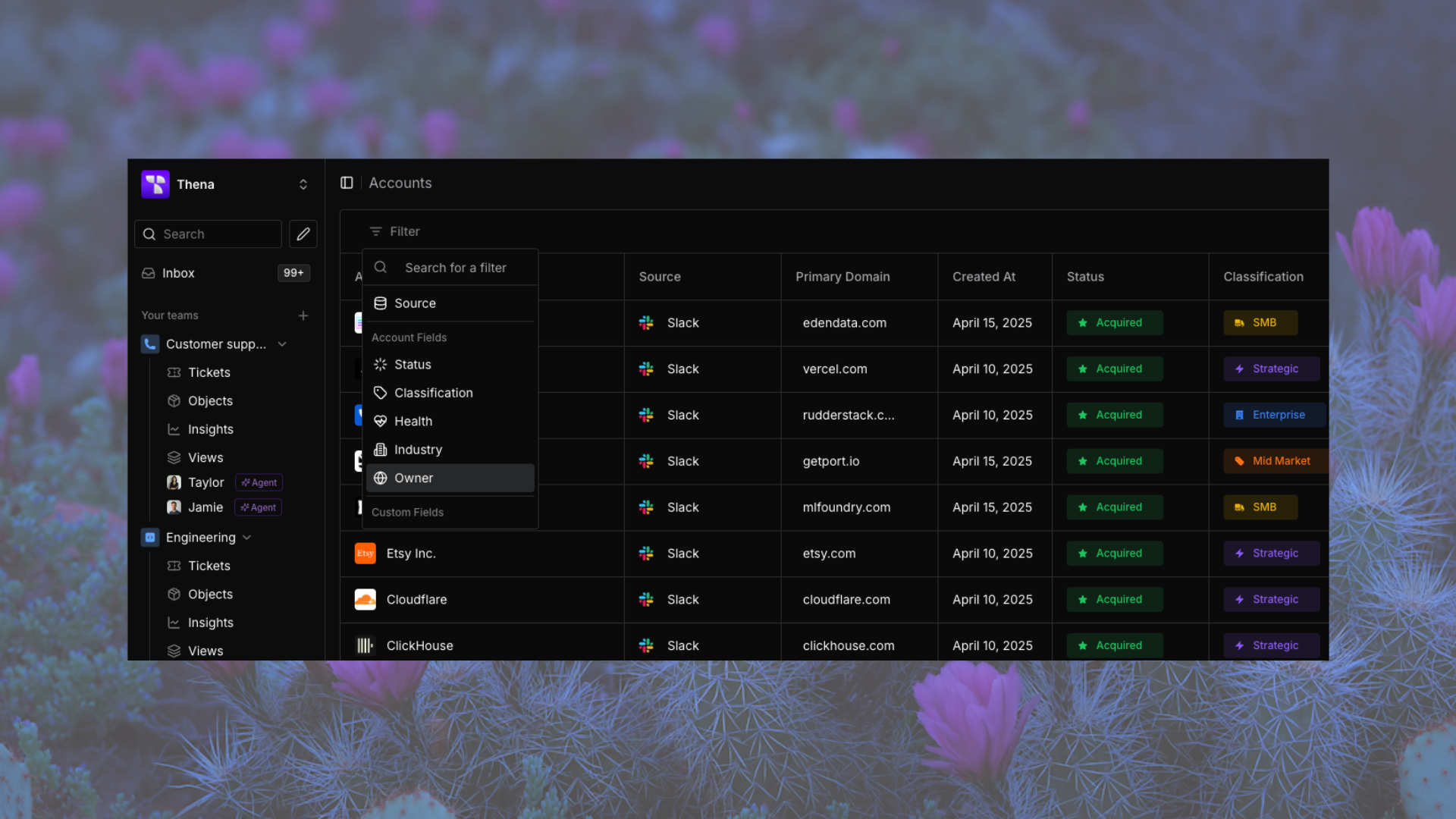
Unified account table
A searchable, sortable, filterable view of all customer accounts. Columns are configurable — teams show what they care about and hide what they don't. Supports bulk actions: update settings, assign accounts, trigger workflows across multiple accounts simultaneously.
Account profiles
Each account has a 360° profile: CRM-enriched fields, custom attributes, associated contacts, all tickets across departments, notes, tasks, and a full activity log. Organized in a single detail view — no tab-switching required.
CRM data enrichment
Native Salesforce and HubSpot integrations sync account fields bidirectionally. Custom Thena attributes sit alongside CRM data in a unified schema. Teams can add custom fields on top of synced data — extending the model without breaking the sync.
Saved views
Users can save custom table views with column visibility, filter combinations, and account source segmentation. A head of support can have their "at-risk accounts" view; a CSM can have their assigned portfolio. Views persist across sessions and can be shared across the team.
Tasks
Account-level task tracking with configurable task types (Review, Follow-up, Approval) and statuses. Supports ownership assignment, due dates, and automation triggers — keeping pending actions organized per customer without leaving Thena.
Notes & activity log
Structured notes with privacy controls, threaded replies, and AI-generated summaries — alongside a real-time activity timeline capturing calls, meetings, emails, and site visits. A living record of every customer interaction, automatically enriched via AI and workflow automation.
The hard calls that shaped the product.
CRMs have an uncanny ability to expand scope. The hard discipline throughout this project was saying no — and being explicit about what this product was not.
We did not build pipeline management. We did not build call logging. We did not build email sequences. Every feature request that pointed toward "full CRM" was redirected: if you already have Salesforce for that, we should integrate — not duplicate. The value was in the support-specific layer on top of existing CRM data, not in replacing the CRM.
Principles we held
- Enrich, don't replace — integrate with Salesforce/HubSpot rather than recreating them
- Context at a glance — the default account view should answer the top 5 questions without scrolling
- Flexible, not fragile — custom fields without breaking the data model
- Performance first — table views with 1,000+ accounts must be fast on first load
- Progressive disclosure — surface the summary first, let agents drill into detail on demand
- Bulk actions for operators — CS managers work at the portfolio level, not the account level
How we shipped it without disrupting 1,000+ agents.
-
01
Alpha with 3 lighthouse accounts
Ran a closed alpha with three customers who had the most fragmented account data problems. Used their workflows to pressure-test the table view performance, CRM sync reliability, and custom field flexibility before any broader access.
-
02
Gradual rollout with feature flagging
Opened access in waves — starting with self-serve customers (our free tier), then mid-market, then enterprise. Each wave had a feedback loop: a dedicated Slack channel per cohort with direct access to the PM (me). Issues were caught and fixed before they reached the full customer base.
-
03
Measuring adoption vs. usage depth
We tracked more than DAU/MAU. We tracked: how many agents set up a saved view (depth), how many used bulk actions (power usage), how many clicked from an account profile into a linked ticket (cross-feature engagement). These behavioural signals told a richer story than login counts.
What it delivered.
The Accounts CRM became the definitive place agents check before responding to any customer request. It replaced the four-tab shuffle with a single unified view.
Time-to-first-response improved across the board as agents no longer needed to manually assemble context before engaging. Measured via pre/post AHT comparison on accounts using the CRM.
Salesforce and HubSpot integrations in production, with reliable bidirectional field sync and zero reported data consistency issues in the first 90 days post-launch.
CS leadership now uses the Accounts view as the primary lens for quarterly business reviews — replacing manual deck compilation with a live, filterable portfolio view.
What this project taught me.
The hardest part of building a CRM is not the features — it is the discipline of not building features. Every stakeholder has a slightly different model of what a CRM should do, and the surface area of "customer management" is enormous.
What anchored every decision was a single question: does this make an agent faster in their first 30 seconds on a request? If the answer was no, we deferred it.
Key learnings
- CRM scope creep is real — define the primary persona and job-to-be-done before the first PRD line
- Integration reliability is a product feature — a CRM that syncs unreliably is worse than no CRM
- Custom fields need governance — unlimited flexibility creates a mess; provide structure with flexibility
- Table performance is non-negotiable — slow tables kill adoption faster than missing features
- The best onboarding is zero onboarding — the product should be learnable from the interface alone